[kubernates] 002. The Perfect Kubernetes Installation
From Virtual Machines to Kubernetes Cluster

- hpyYh
- 3 min read
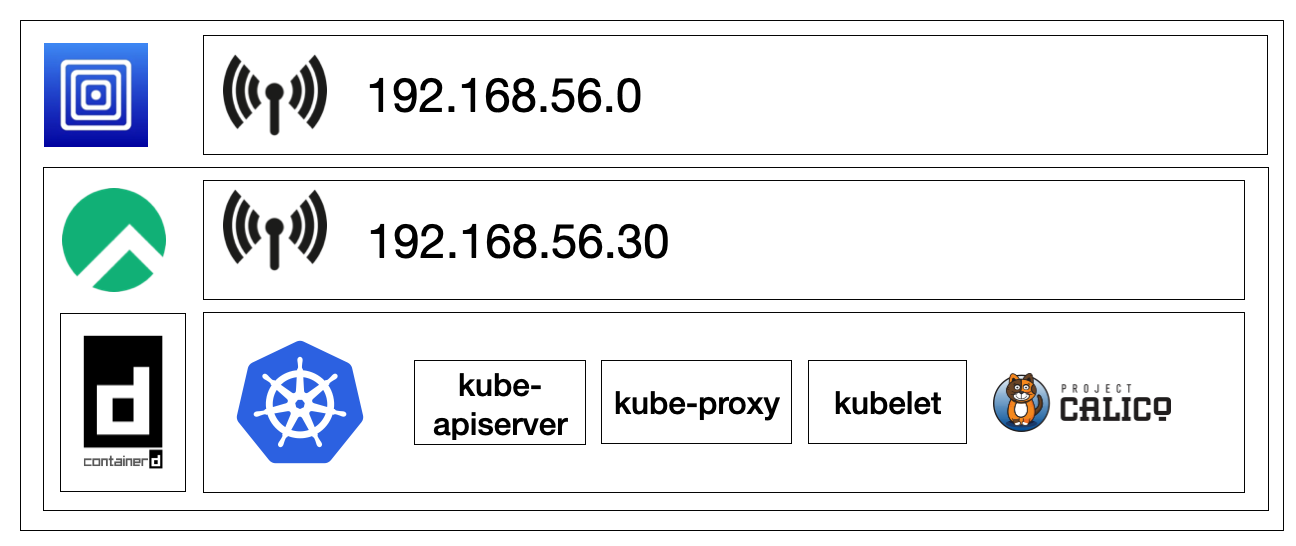
VM Setting
- Start : Virtualize
- Operating System : Linux
- Linux : Boot ISO Image [Browse..] -> Rocky ISO
- Hardware : Memory : 6144 MB, CPU Cores : 4
- Size : 32 GB
- Shared Directory : X
- Summary : Name : k8s-master
- Guest Network : 192.168.56.0/24
OS Installation
- hostname : k8s-master
- adress : 192.168.56.30
- netmask : 255.255.255.0
- gateway : 192.168.56.1
Kubernetes Installation
echo '======== [4] Rocky Linux ========'
# yum -y update # (x)

echo '======== [4-2] time zone ========'
timedatectl set-timezone Asia/Seoul
timedatectl set-ntp true
chronyc makestep

echo '======== [4-3] [WARNING FileExisting-tc]: tc not found in system path log update ========'
yum install -y yum-utils iproute-tc
echo '======== [4-3] [WARNING OpenSSL version mismatch log update ========'
yum update openssl openssh-server -y

echo '======= [4-4] hosts =========='
cat << EOF >> /etc/hosts
192.168.56.30 k8s-master
EOF

echo '======== [5] kubeadm prework ========'
echo '======== [5] firewalld stop ========'
systemctl stop firewalld && systemctl disable firewalld

echo '======== [5] Swap off ========'
swapoff -a && sed -i '/ swap / s/^/#/' /etc/fstab

echo '======== [6] containerd installation ========'
echo '======== [6-1] prework ========'
cat <<EOF |tee /etc/modules-load.d/k8s.conf
overlay
br_netfilter
EOF

modprobe overlay
modprobe br_netfilter

cat <<EOF |tee /etc/sysctl.d/k8s.conf
net.bridge.bridge-nf-call-iptables  = 1
net.bridge.bridge-nf-call-ip6tables = 1
net.ipv4.ip_forward                 = 1
EOF

sysctl --system

echo '======== [6-2] containerd installation ========'
echo '======== [6-2-1] containerd package installation (option2) ========'
echo '======== [6-2-1-1] docker engine installation ========'
echo '======== [6-2-1-1] repo installation ========'
yum-config-manager --add-repo https://download.docker.com/linux/centos/docker-ce.repo

echo '======== [6-2-1-1] containerd installation ========'
yum install -y containerd.io-1.6.21-3.1.el9.aarch64
systemctl daemon-reload
systemctl enable --now containerd

echo '======== [6-3] container runtime : cri activate ========'
containerd config default > /etc/containerd/config.toml
sed -i 's/ SystemdCgroup = false/ SystemdCgroup = true/' /etc/containerd/config.toml
systemctl restart containerd

echo '======== [7] kubeadm installation ========'
echo '======== [7] repo setting ========'
cat <<EOF | sudo tee /etc/yum.repos.d/kubernetes.repo
[kubernetes]
name=Kubernetes
baseurl=https://pkgs.k8s.io/core:/stable:/v1.27/rpm/
enabled=1
gpgcheck=1
gpgkey=https://pkgs.k8s.io/core:/stable:/v1.27/rpm/repodata/repomd.xml.key
exclude=kubelet kubeadm kubectl cri-tools kubernetes-cni
EOF

echo '======== [7] SELinux setting ========'
setenforce 0
sed -i 's/^SELINUX=enforcing$/SELINUX=permissive/' /etc/selinux/config

echo '======== [7] kubelet, kubeadm, kubectl package install ========'
yum install -y kubelet-1.27.2-150500.1.1.aarch64 kubeadm-1.27.2-150500.1.1.aarch64 kubectl-1.27.2-150500.1.1.aarch64 --disableexcludes=kubernetes
systemctl enable --now kubelet

echo '======== [8] Creating a Cluster with kubeadm  ========'
echo '======== [8-1] Cluster init (Pod Network setting) ========'
kubeadm init --pod-network-cidr=20.96.0.0/12 --apiserver-advertise-address 192.168.56.30

echo '======== [8-2] kubectl use configuration ========'
mkdir -p $HOME/.kube
cp -i /etc/kubernetes/admin.conf $HOME/.kube/config
chown $(id -u):$(id -g) $HOME/.kube/config

echo '======== [8-3] Pod Network installation (calico) ========'
kubectl create -f https://raw.githubusercontent.com/k8s-1pro/install/main/ground/k8s-1.27/calico-3.26.4/calico.yaml
kubectl create -f https://raw.githubusercontent.com/k8s-1pro/install/main/ground/k8s-1.27/calico-3.26.4/calico-custom.yaml

echo '======== [8-4] Allowing Pod Scheduling on the Master Node ========'
kubectl taint nodes k8s-master node-role.kubernetes.io/control-plane-

echo '======== [9] Installing Kubernetes Productivity Tools ========'
echo '======== [9-1] kubectl Autocompletion ========'
yum -y install bash-completion
echo "source <(kubectl completion bash)" >> ~/.bashrc
echo 'alias k=kubectl' >>~/.bashrc
echo 'complete -o default -F __start_kubectl k' >>~/.bashrc
source ~/.bashrc

echo '======== [9-2] Dashboard installation ========'
kubectl create -f https://raw.githubusercontent.com/k8s-1pro/install/main/ground/k8s-1.27/dashboard-2.7.0/dashboard.yaml

echo '======== [9-3] Metrics Server installation ========'
kubectl create -f https://raw.githubusercontent.com/k8s-1pro/install/main/ground/k8s-1.27/metrics-server-0.6.3/metrics-server.yaml
- tags :
- Kubernetes